
Last Updated: June 2026
Introduction
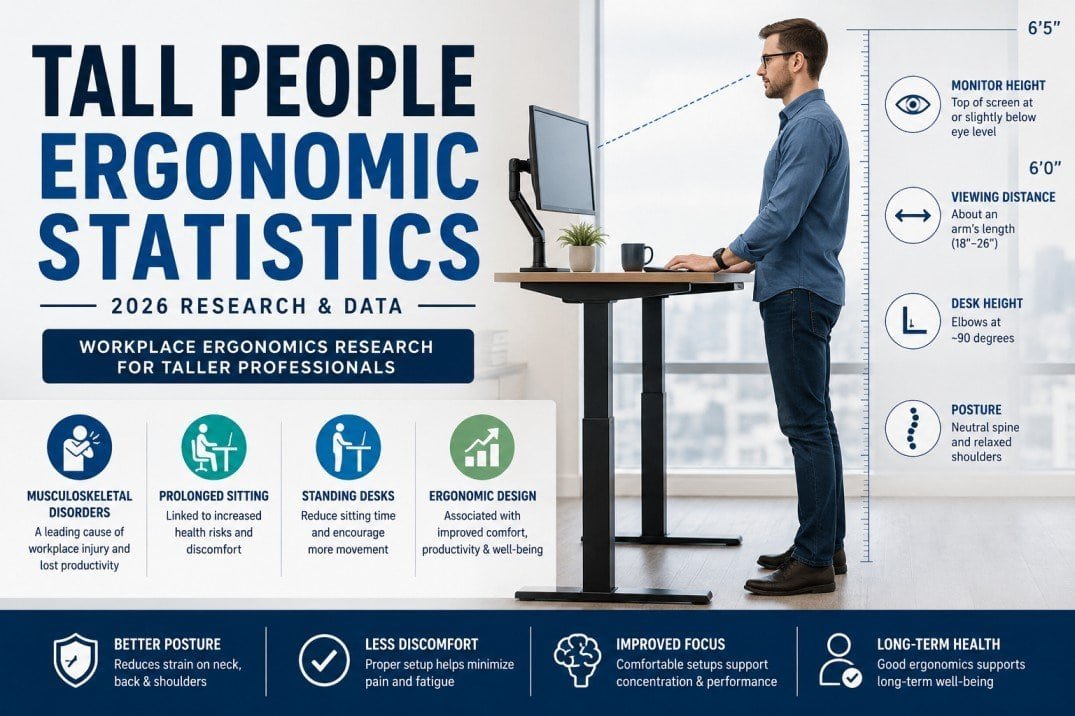
Tall people ergonomic statistics show that workstation design, desk height, monitor placement, and posture can significantly affect comfort and productivity. Desks may sit too low, monitors may require additional elevation, and poorly adjusted workstations can contribute to neck, shoulder, wrist, and back discomfort.
This research page compiles workplace ergonomics statistics and findings from reputable organizations and published studies. The goal is to provide a central resource for understanding the relationship between workstation design, posture, productivity, and musculoskeletal health.
All statistics are sourced from publicly available research and government or institutional publications whenever possible.
Tall People Ergonomic Statistics: Key Findings
| Statistic | Finding |
|---|---|
| Musculoskeletal disorders | A leading cause of workplace injury and lost productivity |
| Neck pain prevalence | Common among office workers using poorly positioned monitors |
| Standing desk adoption | Increasing among remote and office workers |
| Posture-related discomfort | Frequently associated with workstation setup issues |
| Ergonomic interventions | Associated with improved comfort and productivity |
Workplace Ergonomics Statistics
Workplace ergonomics plays a critical role in employee comfort, productivity, and long-term musculoskeletal health. Research from government agencies and occupational health organizations consistently shows that poorly designed workstations can contribute to discomfort, repetitive strain injuries, and reduced workplace performance.
Key findings from workplace ergonomics research include:
- The Occupational Safety and Health Administration (OSHA) identifies work-related musculoskeletal disorders (MSDs) as one of the most frequently reported causes of lost or restricted work time. Common MSDs include neck strain, shoulder injuries, tendonitis, carpal tunnel syndrome, and lower back pain.
- According to the National Institute for Occupational Safety and Health (NIOSH), ergonomics focuses on designing work environments, equipment, and tasks to match the capabilities of workers. Proper ergonomic design can help reduce workplace injuries and improve overall safety.
- NIOSH reports that awkward postures, repetitive motions, prolonged static positions, and excessive reaching are among the most common workplace risk factors associated with musculoskeletal disorders.
- OSHA’s computer workstation guidance notes that extended periods of computer use, particularly when combined with repetitive tasks and poor posture, can increase the risk of discomfort and musculoskeletal injury.
- Research reviewed by OSHA indicates that properly adjusted workstations can help reduce awkward body positions that place unnecessary stress on muscles, tendons, nerves, and joints.
- Mayo Clinic identifies poor posture during computer work as a common contributor to neck pain and recommends maintaining proper monitor height, chair positioning, and workstation alignment to reduce strain.
- Occupational health research consistently supports the use of ergonomic interventions such as adjustable desks, monitor positioning, supportive seating, and regular movement breaks to improve comfort and reduce physical stress during prolonged computer work.
For tall professionals, these findings are particularly important. Standard office furniture is often designed around average-height users, which can force taller individuals into awkward shoulder, neck, wrist, and back positions. Proper desk height, monitor placement, and workstation customization are essential components of an ergonomic setup for taller users.
If you are setting up a workstation for a taller body type, see our guides on Best Desk Height for Tall People, Best Standing Desk Height for Tall People, and Best Ergonomic Desk Setup for Tall People for detailed setup recommendations.
Standing Desk Statistics
Standing desks have become increasingly popular as awareness grows around the health risks associated with prolonged sitting. While standing desks are not a complete solution to workplace discomfort, research suggests that sit-stand workstations can help reduce sedentary behavior and encourage more movement throughout the workday.
Key findings from standing desk research include:
- The Centers for Disease Control and Prevention (CDC) notes that prolonged sitting is associated with increased health risks and that incorporating movement throughout the workday can support overall health and well-being.
- Research published in the British Medical Journal (BMJ) found that sit-stand workstations can significantly reduce daily sitting time among office workers. Participants using sit-stand desks spent less time sitting during working hours compared to those using traditional seated workstations.
- A review of workplace interventions published by the Cochrane Collaboration found that sit-stand desks are among the most effective office-based interventions for reducing occupational sitting time.
- Studies have shown that alternating between sitting and standing may help reduce discomfort in the lower back and upper body for some office workers, particularly when combined with proper workstation ergonomics and regular movement.
- The Mayo Clinic recommends varying posture throughout the day rather than remaining in a single position for extended periods. Both prolonged sitting and prolonged standing can contribute to discomfort if movement is limited.
- Research on workplace productivity generally indicates that standing desk use does not negatively affect typing performance or computer-based work when workstations are properly adjusted.
- Occupational health experts emphasize that standing desks should be viewed as part of a broader ergonomic strategy that includes proper desk height, monitor positioning, supportive seating, and regular movement breaks.
What This Means for Tall Professionals
Standing desks can provide significant ergonomic benefits for taller users when the desk offers sufficient height adjustment. Many standard desks fail to rise high enough for people over 6’2″, forcing them to elevate their shoulders, bend their wrists, or lean forward while working.
For tall users, the most important factor is not simply owning a standing desk but ensuring that the desk can be adjusted to the correct elbow height while maintaining neutral wrist and shoulder positioning. A desk that is too low can create many of the same posture problems associated with traditional seated workstations.
When paired with proper monitor placement, ergonomic accessories, and regular posture changes throughout the day, a correctly adjusted standing desk can help support long-term comfort and productivity for taller professionals.
Related guides:
- Best Standing Desks for Tall People
- Best Standing Desk Height for Tall People
- Standing Desk Height Chart for Tall People
- Common Standing Desk Mistakes Tall People Should Avoid
Monitor Height and Neck Pain Research
Monitor placement is one of the most important yet frequently overlooked components of an ergonomic workstation. Numerous occupational health studies have found a strong relationship between improper screen positioning, poor posture, and the development of neck, shoulder, and upper back discomfort among computer users.
One of the most common ergonomic problems is forward head posture. This occurs when users lean their head forward to view a screen that is positioned too low, too far away, or at an improper viewing angle. Over time, forward head posture can increase strain on the muscles, ligaments, and joints of the neck and upper back.
Research from occupational health and ergonomics organizations consistently shows that prolonged computer work with poor monitor positioning can contribute to musculoskeletal discomfort. The Occupational Safety and Health Administration (OSHA) recommends positioning computer monitors at a height and distance that allow users to maintain a neutral head and neck posture while viewing the screen comfortably.
According to Mayo Clinic ergonomic recommendations, the top of a computer monitor should generally be positioned at or slightly below eye level. This setup helps reduce the tendency to tilt the head downward or extend the neck forward while working. Maintaining a neutral viewing angle can help decrease muscle tension and reduce cumulative strain over long work sessions.
Monitor distance is also an important factor. Ergonomic guidelines typically recommend placing the screen approximately an arm’s length away from the user. When monitors are positioned too close, users may experience increased eye strain. When screens are too far away, users often compensate by leaning forward, which can place additional stress on the neck and shoulders.
For tall professionals, monitor positioning challenges are often amplified. Many standard monitor stands do not provide sufficient height adjustment, causing taller users to look downward for extended periods. This issue is particularly common when using laptops or monitors with fixed stands. As a result, tall users frequently benefit from monitor arms or monitor risers that allow screens to be positioned at an appropriate viewing height.
Research on workstation ergonomics also emphasizes the importance of aligning monitor height with overall workstation setup. Even if desk height is adjusted correctly, a monitor that sits too low can still contribute to poor posture and discomfort. Effective ergonomic design requires proper coordination between desk height, chair height, keyboard placement, and monitor positioning.
Key Research Findings
- Poor monitor positioning is associated with increased neck and upper back discomfort among computer users.
- Forward head posture can increase stress on cervical spine structures and surrounding muscles.
- Ergonomic guidelines generally recommend positioning the top of the screen at or slightly below eye level.
- Monitor distance should typically allow comfortable viewing without leaning forward.
- Adjustable monitor arms can improve workstation flexibility and support proper screen positioning.
- Tall users often require additional monitor elevation compared to average-height users.
For taller professionals, achieving proper monitor height is often one of the most effective ways to reduce neck strain and improve long-term workstation comfort. A monitor positioned at the correct height encourages a neutral head position, supports healthier posture, and helps create a more ergonomic workspace overall.
Related Guides:
- Best Monitor Height for Tall People
- Best Monitor Setup for Tall People Working Long Hours
- Best Monitor Arms for Tall People
- Neck and Upper Back Pain for Tall People at Desks
Desk Height and Posture Findings
Desk height is one of the most important factors influencing workplace posture and ergonomic comfort. Even small mismatches between desk height and body dimensions can lead to increased stress on the shoulders, neck, wrists, elbows, and lower back. For tall professionals, the consequences are often more significant because many standard desks are designed around average-height users rather than individuals with longer limbs and larger body proportions.
Ergonomic research consistently emphasizes the importance of maintaining a neutral working posture while performing computer-based tasks. A properly adjusted desk allows users to keep their shoulders relaxed, elbows close to the body, forearms approximately parallel to the floor, and wrists in a neutral position while typing. When desk height is incorrect, the body is forced to compensate through awkward postures that can contribute to discomfort over time.
A desk that is too low often causes users to round their shoulders, bend forward, or flex their wrists upward while typing. These positions can increase strain on the upper back, neck, shoulders, and forearms. Tall individuals are particularly susceptible to these issues because standard desk heights frequently sit below their ideal ergonomic working position.
Conversely, a desk that is too high can cause users to elevate their shoulders or extend their wrists upward while working. This may increase muscle tension in the neck and shoulders and place additional stress on the wrist joints. Over long periods, these repetitive postures can contribute to discomfort and reduced workplace comfort.
Occupational health organizations commonly recommend adjusting desk height based on elbow position rather than relying solely on general height charts. When seated or standing, the work surface should allow the elbows to remain close to a 90-degree angle while keeping the shoulders relaxed. This position helps reduce unnecessary muscle activation and promotes more efficient movement throughout the workday.
Research also highlights the importance of viewing desk ergonomics as part of a complete workstation system. Proper desk height alone cannot compensate for a poorly positioned monitor, inadequate chair support, or incorrect keyboard placement. Effective workstation design requires all components to work together to support a neutral and comfortable posture.
For tall users, adjustable furniture often provides the best ergonomic outcome. Height-adjustable standing desks, ergonomic chairs with appropriate seat depth, monitor arms, and keyboard trays allow taller individuals to customize their workstations according to their specific body dimensions rather than adapting to fixed furniture limitations.
Key Research Findings
- Proper desk height helps maintain neutral shoulder, elbow, and wrist positioning.
- Poor desk height can contribute to neck, shoulder, wrist, and upper back discomfort.
- Ergonomic guidelines typically recommend adjusting desk height based on elbow position rather than overall body height.
- Tall users frequently require higher desk settings than those provided by standard office furniture.
- Adjustable workstations can improve ergonomic fit and support healthier posture habits.
- Desk height, monitor placement, and chair positioning should be optimized together for best results.
For taller professionals, selecting the correct desk height is one of the most effective ways to improve workstation comfort and reduce unnecessary physical strain. A properly adjusted desk promotes healthier posture, supports productivity, and provides a stronger ergonomic foundation for long-term computer work.
Related Guides:
- Best Desk Height for Tall People
- Best Standing Desk Height for Tall People
- Standing Desk Height Chart for Tall People
- Best Ergonomic Desk Setup for Tall People
- Common Standing Desk Mistakes Tall People Should Avoid
Research Sources
The information presented on this page is based on research, guidance, and publications from recognized health, safety, and ergonomics organizations. These sources are widely referenced by employers, occupational health professionals, researchers, and workplace safety specialists when developing ergonomic recommendations and workstation standards.
The following organizations and institutions were used as primary references when compiling this research resource:
Occupational Safety and Health Administration (OSHA)
OSHA provides workplace safety guidance for employers and employees across the United States. Its ergonomics resources cover computer workstation setup, musculoskeletal disorder prevention, posture recommendations, and best practices for reducing workplace injury risks.
Website:
https://www.osha.gov/ergonomics
National Institute for Occupational Safety and Health (NIOSH)
NIOSH is a division of the Centers for Disease Control and Prevention (CDC) focused on occupational health and workplace safety research. NIOSH publishes research and guidance related to ergonomics, workplace injury prevention, repetitive stress injuries, and workstation design.
Website:
https://www.cdc.gov/niosh/topics/ergonomics
Centers for Disease Control and Prevention (CDC)
The CDC provides health information and research related to physical activity, workplace health, injury prevention, and occupational well-being. Many workplace ergonomics recommendations are supported by CDC research and public health guidance.
Website:
https://www.cdc.gov
Mayo Clinic
Mayo Clinic is a globally recognized nonprofit medical organization that publishes evidence-based health information. Its resources on posture, neck pain, back pain, and workstation ergonomics help explain how workplace setup can affect physical health and comfort.
Website:
https://www.mayoclinic.org
Cornell University Ergonomics Web
Cornell University’s Ergonomics Web provides practical workstation setup recommendations, ergonomic research summaries, and guidance for computer users seeking to improve posture and workplace comfort.
Website:
https://ergo.human.cornell.edu
Peer-Reviewed Ergonomics Research
In addition to guidance from government agencies and medical institutions, this page references findings from peer-reviewed research related to workstation ergonomics, standing desks, posture, musculoskeletal health, and occupational performance.
Peer-reviewed studies provide valuable evidence regarding the relationship between workstation design, physical comfort, productivity, and long-term workplace health outcomes.
Research Update Policy
TallErgoDesk reviews and updates research-based content periodically to ensure information remains accurate and relevant. As new ergonomic studies and workplace health findings become available, this page may be expanded to include additional research and updated recommendations.
Last Updated: June 2026
Related Ergonomic Guides
Research and statistics provide valuable insight into workplace ergonomics, but applying those findings to a real-world workstation requires practical guidance. The following resources are designed specifically for tall professionals looking to build a healthier, more comfortable, and more productive workspace.
Best Desk Height for Tall People
Choosing the correct desk height is one of the most important ergonomic decisions for taller users. This guide explains how desk height affects posture, wrist alignment, shoulder comfort, and long-term workstation health. It also provides practical recommendations for determining your ideal desk height based on body dimensions rather than generic furniture standards.
Read Guide: Best Desk Height for Tall People
Best Standing Desk Height for Tall People
Standing desks can improve movement and reduce sedentary behavior, but only when adjusted correctly. This guide explains how tall users can determine the proper standing desk height based on elbow position, monitor placement, and ergonomic alignment.
Read Guide: Best Standing Desk Height for Tall People
Standing Desk Height Chart for Tall People
Need a quick reference? This standing desk height chart provides practical height recommendations for users of different heights. It can be used as a starting point when setting up a standing workstation or evaluating whether a desk offers sufficient adjustment range.
Read Guide: Standing Desk Height Chart for Tall People
Best Ergonomic Desk Setup for Tall People
Workstation ergonomics involves more than desk height alone. This complete setup guide covers desk positioning, monitor placement, keyboard alignment, chair adjustment, lighting, and workspace organization for taller professionals.
Read Guide: Best Ergonomic Desk Setup for Tall People
Best Monitor Height for Tall People
Monitor positioning is one of the most common causes of neck and upper back discomfort among office workers. This guide explains how to position screens correctly and how tall users can avoid the monitor placement mistakes that frequently contribute to poor posture.
Read Guide: Best Monitor Height for Tall People
Best Monitor Setup for Tall People Working Long Hours
Professionals who spend extended periods in front of a screen often require additional workstation adjustments. This guide focuses on monitor placement strategies that can improve viewing comfort and reduce physical strain during long work sessions.
Read Guide: Best Monitor Setup for Tall People Working Long Hours
Neck and Upper Back Pain for Tall People at Desks
Many tall professionals experience recurring neck and upper back discomfort caused by workstation design issues. This guide explores common causes, ergonomic corrections, and practical strategies for reducing strain while working.
Read Guide: Neck and Upper Back Pain for Tall People at Desks
Standing Desk Accessories for Tall People
The right accessories can significantly improve workstation comfort and adjustability. This guide covers monitor arms, anti-fatigue mats, keyboard trays, footrests, and other ergonomic upgrades designed to support taller users.
Read Guide: Standing Desk Accessories for Tall People
Continue Building Your Ergonomic Workspace
Creating a comfortable workstation is not about purchasing a single product. It requires a combination of proper desk height, monitor positioning, supportive accessories, and healthy work habits. By combining evidence-based ergonomic principles with practical workstation adjustments, tall professionals can create work environments that support comfort, productivity, and long-term health.
Conclusion
The research reviewed on this page highlights the importance of proper workstation design, posture, monitor placement, and desk height for long-term comfort and productivity. While many ergonomic recommendations are developed for average-height users, tall professionals often face additional challenges that require greater workstation adjustability and customization.
These tall people ergonomic statistics and research findings demonstrate that factors such as desk height, monitor position, movement throughout the workday, and ergonomic workstation design can have a meaningful impact on workplace comfort. By applying evidence-based ergonomic principles, taller users can reduce unnecessary strain and create workspaces that better support long-term health and performance.